
Import, export and sync
A dictionary travels in three forms: the .parrot file, made for sharing; JSON, for backups; and CSV, for
writing and fixing content in a spreadsheet.
Importing
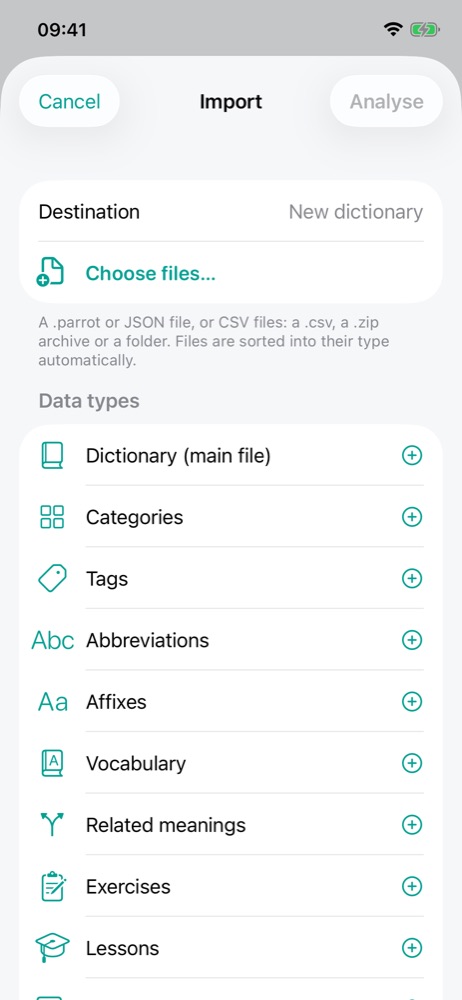
Home … menu › Import…, then Choose files…. The app accepts:
| File | Use |
|---|---|
.parrot | The distribution format: one archive holding the whole dictionary. Tapping a .parrot
file you received (Files, Mail, AirDrop, a browser…) opens its import directly. |
.json | A full backup or share, training results included if the export contains them. |
.csv, .zip or folder | A dictionary's files written in a spreadsheet (see Creating a dictionary). |
Files sort themselves by type (dictionary, categories, tags, abbreviations, affixes, vocabulary, related meanings, exercises, lessons, resources); you can add or remove them type by type. Analyse checks everything and shows a preview: what will be created, changed or archived, and any errors with their file, line and column. Nothing is written before you confirm. Ignore invalid data drops each faulty object as a whole (a meaning and its words, a series, a lesson…) and analyses again.
A dictionary you already have
If the file matches a dictionary you already have, the app lets you choose:
- Update: the dictionary is changed in place and your training results are kept. With CSV, either as a complement (files add and change; an empty cell changes nothing; nothing is archived) or as a complete version (files describe everything: an empty cell clears, and whatever is missing is archived);
- Duplicate: an independent dictionary is created; the existing one does not change;
- Replace (JSON): an independent dictionary is created, then the existing one is archived.
From a dictionary, you can also merge in files from elsewhere: shared words are matched instead of duplicated, and on conflict your dictionary wins.
Exporting 🔒
Long press on a home-screen card › Export…:
- JSON: the whole dictionary, to share or back up;
- CSV: one or more files per data type, to open in a spreadsheet; tick the types to export and bundle them in a
.ziparchive if you like.
A CSV export fixed in a spreadsheet re-imports as an update: the references and identifiers it contains find each object again, without losing any training results.
Sync between devices 🔒
Settings › Sync shares content and progress between your devices, without an account:
- Shared folder: a folder all devices can reach (iCloud Drive, a network share…);
- REST server: a server you host, given by its address and a secret token.
Nothing syncs while a review is in progress.